
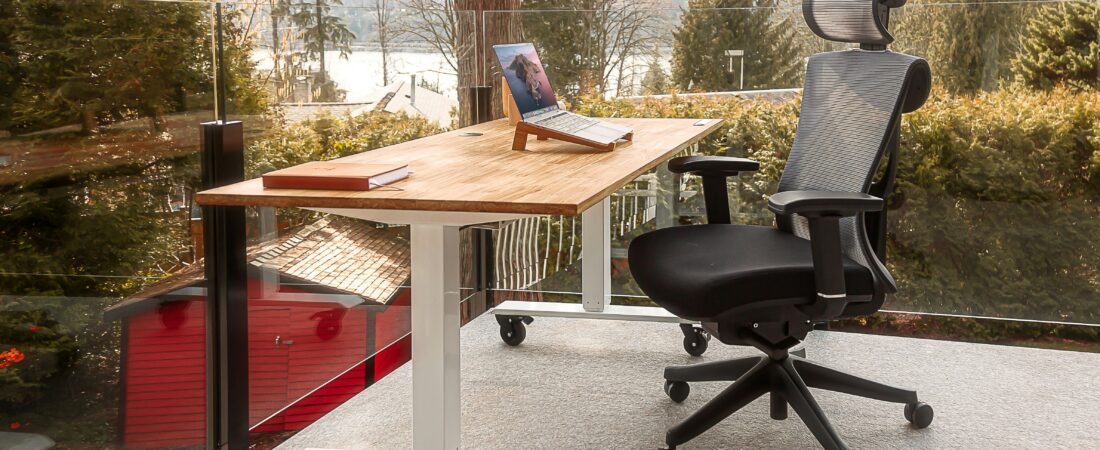
Best ergonomic chairs for back pain in Canada (2026) — what I would buy if I were shopping today
The chair is the foundation — everything else works better when it is right. After twelve years of back pain and months of research, here is what I would buy at three honest budgets, all actually available on Amazon Canada — and the truth about the chair everyone asks about.
I spent twelve years in hospitality — day shifts, late nights, overnight shifts from age twenty. By my mid-twenties I had chronic pain in my back, legs, and shoulders that massage, chiropractic care, and acupuncture could not fully fix.
When I moved into a desk-based supervisor role, I assumed the back pain would ease up. Instead, a new version of it appeared. Same body, different cause. That is when I started searching for the best ergonomic chair for back pain — and realised pretty quickly how much of the affiliate content out there is just made up.
The chair felt fine when you bought it. Your back disagrees by mid-afternoon.
- A lower back that aches a little more with every hour in the chair
- Lumbar “support” that is either missing entirely or a fixed bar in the wrong spot
- Review sites that all point to the same $2,000 chairs you cannot justify
- The fear of spending $500 on a chair and feeling no different
How I can help: I compare three real chairs at three honest budgets, all of them actually on Amazon Canada with verifiable model names. And I tell you the truth about the Herman Miller Aeron — including why the “Aerons” on Amazon.ca are not what they appear to be.
Why you can trust me: twelve years of back pain taught me what desperate shopping feels like. I have not sat in every chair on this page, and I say so plainly. This is months of reading forums, long-form reviews, and spec sheets — what I would buy, and what I would skip.
Here is what I want to be honest about up front. I have not personally sat in every chair on this list. I am one person with one back, and I cannot afford to test-buy four office chairs. What I have done is spend months reading ergonomics forums, watching long-form review videos, comparing spec sheets, and checking what is actually available on Amazon Canada — because a recommendation you cannot easily buy is useless. This guide is what I would buy if I were shopping today, at three different budgets.
My top picks at a glance
Three chairs at three real budgets, all available on Amazon Canada right now:
- Best overall: Sihoo Doro C300 — the chair I would buy with my own money today (~$558 CAD)
- Premium pick: Hbada E3 Air — for bigger frames and longer sit-times (~$620 CAD)
- Budget pick: Sihoo M57 — proper lumbar support under $250 (~$224 CAD)
1. Sihoo Doro C300 — best overall
Sihoo Doro C300 Ergonomic Office Chair
Why I would buy it: The Doro C300 is the chair Sihoo built to compete with the much pricier ergonomic options, and on paper it does. You get dynamic lumbar support that adjusts to your back as you move, ultra-soft 3D armrests that move four ways, an adjustable headrest, and a breathable mesh back. At around $558 CAD, that is a feature set that used to cost twice as much.
Sihoo as a brand has been climbing fast in the ergonomics space over the last couple of years, and the Doro line is what most reviewers point to as their flagship. The C300 specifically gets called the “budget Aeron alternative” a lot — not because it matches a Herman Miller, but because it gets you most of the way there for a fraction of the price.
- Dynamic lumbar that moves with you
- 4D adjustable armrests
- Adjustable headrest included
- Breathable mesh — will not get hot
- Big and tall rated
- Assembly takes 30-45 minutes
- Mesh seat can feel firm at first
- Newer brand — less long-term track record than Herman Miller
2. Hbada E3 Air — premium pick for bigger frames
Hbada E3 Air Ergonomic Office Chair
Why I would buy it: The E3 Air’s standout feature is its 3-zone dynamic lumbar support, which targets your upper, mid, and lower back independently. That matters if you have pain that is not just at the lumbar — which a lot of long-time desk workers do. Hbada also rates this chair specifically for big and tall users, with a higher weight capacity and longer seat depth than most chairs in this price range.
It is a step up in price from the Doro C300 and a step up in build quality. If you are spending eight or more hours a day in your chair, or you are on the bigger side and standard chairs feel cramped, the extra spend probably makes sense.
- 3-zone dynamic lumbar support
- 3D adjustable headrest
- 3D adjustable armrests
- Big and tall rated with higher weight capacity
- Hbada has a long track record in budget ergonomics
- ~$60 CAD more than the Doro C300
- No footrest in this version
- Slightly bulkier — needs more desk space
3. Sihoo M57 — best budget pick under $250
Sihoo M57 Ergonomic Office Chair
Why I would buy it: The M57 is Sihoo’s entry-level ergonomic chair and probably the best chair you can get under $250 CAD that still has proper adjustable lumbar support, a headrest, and breathable mesh. It does not have the dynamic lumbar of the Doro C300 or the 3-zone system of the Hbada — but for a quarter of the price of premium chairs, it is a serious upgrade over a basic office chair.
I would recommend this for anyone on a tight budget, students, or someone who is not sure they want to commit to a $500+ chair before knowing whether ergonomic seating actually helps their back. Buy this, see if it makes a difference over a few months, and upgrade later if you want to.
- Under $250 CAD
- Adjustable lumbar support
- Adjustable headrest
- Breathable mesh back
- Same brand as the Doro line — easy upgrade path
- Static lumbar (does not move with you)
- 2D armrests instead of 4D
- Build quality reflects the price — will not last 10 years
What about the Herman Miller Aeron?
The chair everyone asks about — and why it is not on this list
The Herman Miller Aeron is the most famous ergonomic chair ever made. It is the one you see in tech offices, the one in every “best of” list, the one your friend with chronic back pain probably owns. It deserves its reputation — the PostureFit SL lumbar system is genuinely excellent and the chair is built to last 10-15 years.
So why is it not on this list? Because real Aerons are not meaningfully sold on Amazon Canada. When you search “Herman Miller Aeron” on Amazon.ca, the top results are headrest accessories made by third-party companies (priced around $200), not actual chairs. A new Aeron from Herman Miller costs $1,800-2,500 CAD. Refurbished ones go for $700-1,200. Either way, you are not buying one for $200 on Amazon.
If you want an Aeron in Canada, here are the real options:
- Herman Miller Canada — direct from the manufacturer at hermanmiller.com
- Crandall Office Furniture — the most trusted source for refurbished Aerons in North America (ships to Canada)
- Authorised dealers — local office furniture stores in major Canadian cities
- eBay or Facebook Marketplace — for genuinely used ones, but inspect carefully before buying
I do not earn anything by telling you this. I am telling you because most of the affiliate sites recommending “refurbished Aerons on Amazon” are sending you to the wrong product entirely, and that is not the kind of site I want to run.
Full comparison table
| Chair | Price (CAD) | Lumbar support | Best for |
|---|---|---|---|
| Sihoo Doro C300 | ~$558 | Dynamic — moves with you | Most people — best value overall |
| Hbada E3 Air | ~$620 | 3-zone dynamic | Big and tall, 8+ hour sitters |
| Sihoo M57 | ~$224 | Adjustable static | Tight budget, first ergonomic chair |
What to look for in an ergonomic chair for back pain
After months of research, here are the features that actually matter:
1. Lumbar support
The most important feature, and the one most cheap chairs get wrong. Your lumbar support should sit in the curve of your lower back and fill that gap naturally. Adjustable lumbar height is essential because everyone’s back is different. Dynamic lumbar (which moves with you) is better than static lumbar (which stays put), but adjustable static is still better than nothing.
2. Seat height adjustment
Your feet should rest flat on the floor with your knees at 90 degrees. If your chair cannot reach that position for your height, no amount of lumbar support will help. Most quality ergonomic chairs adjust between 16-21 inches from the floor.
3. Seat depth
You should be able to sit all the way back in the chair with 2-3 fingers of space between the back of your knee and the seat edge. If the seat is too deep you will either sit forward and lose back support, or you will cut off circulation in your legs. Adjustable seat depth is a nice-to-have but not essential.
4. Armrest adjustability
Your elbows should rest at 90 degrees without shrugging your shoulders. Fixed armrests that are too high or too low cause constant shoulder tension. Look for height-adjustable at minimum — 4D armrests (height, width, depth, angle) are ideal but add to the price.
Frequently asked questions
Is an ergonomic chair really worth it for back pain?
For most people with desk-related back pain, a properly adjusted ergonomic chair is the single most impactful change they can make. Most people notice a difference within the first few weeks. That said, no chair on its own will fix back pain caused by poor monitor height, no movement breaks, or weak core muscles. The chair is the foundation, not the whole house.
How much should I spend on an ergonomic chair in Canada?
For a chair that genuinely addresses back pain, the sweet spot is $400-600 CAD. Below $250 you will get basic adjustability with no dynamic lumbar. Between $250-400 you are in upgrade territory. Above $600 you are paying for premium build quality and longer warranties. The Sihoo Doro C300 at around $558 is where I personally would spend.
Why is the Herman Miller Aeron not on this list?
Because real Herman Miller Aerons are not sold on Amazon Canada. The listings that come up when you search are mostly third-party headrest accessories, not chairs. To buy a real Aeron in Canada, you need to go through Herman Miller direct, an authorised dealer, or a refurbisher like Crandall Office Furniture. I would rather be honest about that than send you to the wrong product to earn an affiliate commission.
Can a chair completely fix chronic back pain?
A good chair significantly reduces the strain that causes desk-related back pain — but it is one part of a complete setup. For best results, also make sure your monitor is at eye level, your keyboard keeps your wrists neutral, and you take movement breaks every 45-60 minutes. If you have sharp, radiating, or pre-existing back conditions, see a physiotherapist as well.
What chair would you personally buy, Tom?
If I were placing an order tonight, the Sihoo Doro C300. It hits the right balance of dynamic lumbar support, full adjustability, and a price that is a real upgrade without being premium-luxury money. I would not personally spend on the Hbada E3 Air unless I were taller or heavier than I am, and the M57 is what I would recommend to a friend who has never owned an ergonomic chair before.
If you have read this far, my free PDF expands the conversation — five things I wish I had tried sooner about body pain, recovery, and the cheap interventions that worked when nothing else did. Free, in your inbox.
If you found this guide helpful, check out my full ergonomic products page for recommendations on standing desks, monitor arms, and accessories that pair well with a good chair. Or read why your back hurts after sitting all day for the broader fixes beyond just the chair.
As an Amazon Associate I earn from qualifying purchases. This never influences my recommendations — only products I genuinely believe in make it onto this site. Prices may vary. The “What about the Aeron?” section contains no affiliate links and earns no commission.